About
 Cannons are the most destructive force in Expeditions, they can Cannons are the most destructive force in Expeditions, they can  Destroy through Walls without needing to set a Destroy through Walls without needing to set a  Trial by Fire. Once a Cannon has been built it can be Pulled like a Trial by Fire. Once a Cannon has been built it can be Pulled like a  Sturdy Sled, however once a Sturdy Sled, however once a  Cannonball has been loaded in, the Cannon can no longer be Pulled. A Cannon can NOT be Cannonball has been loaded in, the Cannon can no longer be Pulled. A Cannon can NOT be  Salvaged. Being hit by a Cannonball will cause Permanent Death. Cannons will fire a distance of about 40 tiles. Salvaged. Being hit by a Cannonball will cause Permanent Death. Cannons will fire a distance of about 40 tiles.
How to Fire a Cannon
- Right-click a Cannonball on the Cannon to load it.
- Tilt the Cannon left or right for further accuracy if necessary.
- With the Artillery Skill learned, light the Cannon using a source of
 Fire such as a Fire such as a  Tinder Drill or lit Tinder Drill or lit  Torch. This will leave Torch. This will leave  Evidence of Waste. Evidence of Waste.
- Wait 7.5 hours. That time may be reduced by up to 1 hour for every 100
 Cloak & Dagger the pilgrim who lights the Cannon has. Cloak & Dagger the pilgrim who lights the Cannon has.
- Once fired the sound can be heard everywhere on the server.
Defending Against A Cannon
Cannons fire after less than 7.5 hours depending on the attackers cloak and dagger, if you notice a lit cannon pointing at your base (If there's a waste scent behind the cannon then it's problably lit!!) you have to do the following things:
- 1. Pclaim the cannon if possible.
- 2. Calculate with Ctrl+L The area the cannon will shoot (Around 40 tiles in front of the cannon)
- 3. Try to build around the cannon shot, or if possible, rebuild another wall after the cannon is shot and before the attackers can enter your base.
- 4. If no one is guarding the cannon and you could pclaim it, you should be able to destroy the cannon easily as it has no soak now, but be aware of the attackers preparing an ambush. Cannons can't be salvaged
Important: Planning is key in expeditions, your towns must be huge in order to defend against cannon shots, build walls every 40 tiles surrounding your town, even a Split-rail Fence will help to deter cannon shots and it will force the attacker to build a Trial by Fire
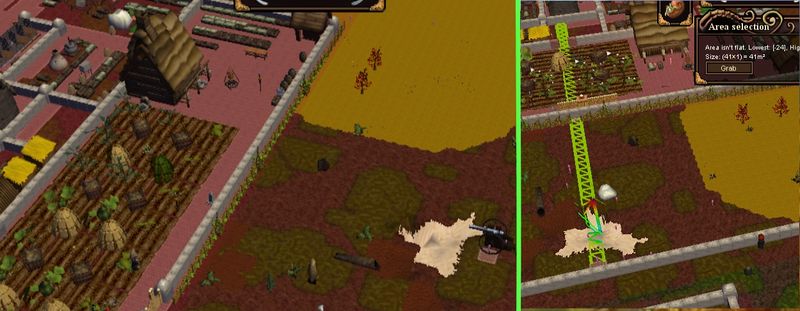 A cannon before and after it was shot, in this case the player could build a plank fence before the attackers could do any major damage, and reinforced his town by building another stone wall at the perimeter. 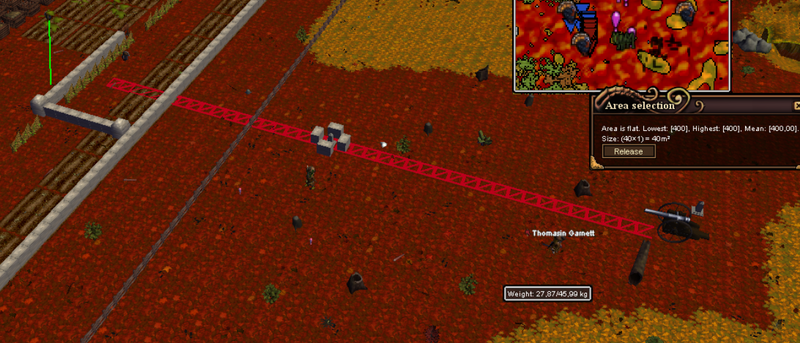 In this case the defenders could build around the cannon shot without suffering any major damage |


